
ChartBook: Know Where Every Number Came From#
Official documentation: backofficedev.github.io/chartbook.
Every pipeline you have built so far pulls its own data. This week one pipeline reads what another one made, and can prove which bytes it read. Git does this for code: a commit hash names every version of every file. ChartBook does it for data: a pipeline declares a build ready with a snapshot, and a pipeline that reads it pins that snapshot in a lockfile committed next to its code.
pip install -U chartbook
chartbook --version        # chartbook, version 0.5.1 (or newer)
Build on another pipeline’s exact output, the way you depend on a package.
chartbook add ftsfr/fed_yield_curve pins its newest snapshot in
chartbook.lock, and what you read changes only when you run
chartbook update.
Every dataframe, chart, and model records what it was made from, by content
hash. chartbook lineage walks the chain back to the first source and checks
every hash on the way.
A snapshot keeps the exact bytes a pipeline made, labelled with the commit
that made them. Rebuild from the same inputs and compare; put back an output
that took a day to compute with chartbook restore.
Many pipelines become one catalog: a website your team browses, and a
command line (chartbook ls, chartbook get-docs) that scripts and agents
ask the same questions.
Objectives of This Chapter
Build an upstream pipeline and snapshot it into your store; open a catalog over it.
Depend on it from a pipeline of your own, read its data by name, and commit the lockfile.
Say which question each tool answers:
doit(what is stale), an orchestrator (when it runs), and ChartBook (what this data is and where it came from).
Parts 1 to 3 take about half an hour at a keyboard. Everything in them uses pip, a plain virtual environment, ChartBook’s defaults, and public data. HW 4 is Part 1 done six times, with one extra line.
1. Build a pipeline, snapshot it, open a catalog#
The FTSFR pipelines are public repositories, one per dataset, and the Fed’s fitted Treasury yield curve needs no credentials. Clone it into a folder that will hold a few of them.
mkdir ftsfr && cd ftsfr
git clone https://github.com/ftsfr/fed_yield_curve

python3.12 -m venv .venv
source .venv/bin/activate
pip install -r fed_yield_curve/requirements.txt
mkdir ftsfr; cd ftsfr
git clone https://github.com/ftsfr/fed_yield_curve

py -3.12 -m venv .venv
.venv\Scripts\Activate.ps1
pip install -r fed_yield_curve/requirements.txt
Python 3.12 is the pipeline’s requirement (its .python-version says so),
the same Python HW 3 uses. The install takes a few minutes. Then:
chartbook trust                      # once: every pipeline in this folder may run its build here
cd fed_yield_curve
chartbook run --snapshot             # builds it (doit), then snapshots what it built
cd ..
chartbook trust says that build scripts in this folder are yours to run.
chartbook run --snapshot checks that everything is committed, runs the
pipeline’s build (about a minute: it pulls the Fed’s file, formats it, runs
the tests and two notebooks, draws the chart), and copies what it built into
your store, with the commit that built it:
ftsfr/fed_yield_curve: build
...
ftsfr/fed_yield_curve at 5bb7217: 4 asset(s) in the store
Snapshot made. A pipeline that depends on this one gets it with `chartbook update`.
There was nothing to set up: the store is ~/.chartbook/store, made when
this first snapshot was.
$ chartbook store info
Store: ~/.chartbook/store
  a folder, the default: neither CHARTBOOK_STORE nor a [store] url in a settings file says otherwise
Now open a site over it:
chartbook catalog init               # asks for a title; Enter takes the default
chartbook catalog build
chartbook catalog open
Catalog title [My Catalog]:
Created global catalog: ~/.chartbook/catalog.toml
...
Catalog site generated: ~/.chartbook/docs/index.html
Click Pipelines, then Fed Yield Curve, then its dataframe. The page has the columns, the date range, a glimpse of the rows, and under Provenance the hash of the file’s bytes and the commit that made them. That page is what this chapter is about.
2. Two more, and the catalog grows#
The same environment serves the other two credential-free pipelines, the Ken French Data Library and the He, Kelly, and Manela intermediary factors, because their requirements are the same.
git clone https://github.com/ftsfr/ken_french_data_library
git clone https://github.com/ftsfr/he_kelly_manela
(cd ken_french_data_library && chartbook run --snapshot)
(cd he_kelly_manela && chartbook run --snapshot)
chartbook catalog build && chartbook catalog open
Run chartbook run --snapshot a second time in any of the three. Nothing
new is written, because nothing changed, and the hash is how it knows
(below):
ftsfr/fed_yield_curve at 5bb7217: 4 asset(s) in the store
Nothing has changed since the snapshot of 2026-11-04 05:41 UTC. No new one was made.
What a person browses on the site, a script asks for at the terminal:
chartbook ls dataframes
ftsfr/fed_yield_curve:ftsfr_treas_yield_curve_zero_coupon: ftsfr_treas_yield_curve_zero_coupon
ftsfr/he_kelly_manela:ftsfr_he_kelly_manela_all: ftsfr_he_kelly_manela_all
ftsfr/he_kelly_manela:ftsfr_he_kelly_manela_factors_daily: ftsfr_he_kelly_manela_factors_daily
ftsfr/he_kelly_manela:ftsfr_he_kelly_manela_factors_monthly: ftsfr_he_kelly_manela_factors_monthly
ftsfr/ken_french_data_library:ftsfr_french_portfolios_25_daily_size_and_bm: ftsfr_french_portfolios_25_daily_size_and_bm
ftsfr/ken_french_data_library:ftsfr_french_portfolios_25_daily_size_and_inv: ftsfr_french_portfolios_25_daily_size_and_inv
ftsfr/ken_french_data_library:ftsfr_french_portfolios_25_daily_size_and_op: ftsfr_french_portfolios_25_daily_size_and_op
chartbook get-docs fed_yield_curve:ftsfr_treas_yield_curve_zero_coupon
prints the dataframe’s write-up, the same text as its page. And from any
folder, the data itself, by name:
from chartbook import data

curve = data.load("fed_yield_curve:ftsfr_treas_yield_curve_zero_coupon")   # a polars LazyFrame
curve = data.load("fed_yield_curve:ftsfr_treas_yield_curve_zero_coupon", format="pandas")
Every FTSFR dataframe is in long format with three columns: unique_id
(which series), ds (the date), and y (the value). For the yield curve,
unique_id runs SVENY01 to SVENY30 and y is in percent.
The same three commands, on the package’s own small example catalog:
3. Depend on it from a pipeline of your own#
Reading by name from any folder is fine for a look. A pipeline that depends on the data pins it, so that the bytes it read are on record. Make the smallest pipeline there is, a folder with a two-line manifest, and add the dependency:
mkdir my_report && cd my_report
git init
printf '[project]\nname = "My Report"\n' > chartbook.toml
chartbook add https://github.com/ftsfr/fed_yield_curve
Added to [dependencies] in my_report/chartbook.toml: "ftsfr/fed_yield_curve" = { repository = "https://github.com/ftsfr/fed_yield_curve" }
ftsfr/fed_yield_curve: 4 pinned
  From its snapshot at 5bb7217, made 2026-11-04 05:41 UTC, which says it was made in https://github.com/ftsfr/fed_yield_curve, in store default.
Wrote chartbook.lock.
chartbook add wrote one line under [dependencies] in chartbook.toml
(given the repository’s address, it records the address too, so the manifest
says where the pipeline’s code lives; chartbook add ftsfr/fed_yield_curve
pins the same snapshot and writes = {}) and a chartbook.lock that names the snapshot and the hash of each of its
four assets. Your code reads the data by name, and the lockfile says which
bytes that name means:
from chartbook import data

curve = data.load("fed_yield_curve:ftsfr_treas_yield_curve_zero_coupon", format="pandas")
chartbook lineage
my_report (this folder)
└── ftsfr/fed_yield_curve: ftsfr/fed_yield_curve 5bb7217, made 2026-11-04 05:41:34 UTC, pins checked
1 snapshot(s) upstream; no gaps.
chartbook lineage walks up from the lockfile: the snapshot is in the
store, it holds what was pinned from it at those hashes, and its own pins
cover its own dependencies. Commit the two files. They are how anyone who
clones your repository knows which data you used:
git add chartbook.toml chartbook.lock
git commit -m "Depend on ftsfr/fed_yield_curve"
A pin never moves by itself. When a newer snapshot appears in your store
(you rebuilt the upstream, say, after the Fed published more days),
chartbook pin and chartbook run tell you a pinned asset changed upstream
and leave your pins alone. chartbook update moves them, and git diff chartbook.lock shows each asset’s old and new hash. Commit that diff as its
own commit; it is what a reviewer reads.
Command |
Pins |
|---|---|
|
Create a pin for a dependency that has none. Never move one; say |
|
Never move one. The build reads the pinned snapshot. |
|
Move: to the newest snapshot. The lockfile diff is the record; commit it on its own |
|
Write nothing. Refuse if any pin is missing or not in a store. What a build server runs |
If you use Claude Code, chartbook install claude-skill teaches it these
commands, and it answers questions like “what data do we have on Treasury
yields, and what is built on it?” from chartbook ls --json and
chartbook get-docs, the same facts as the site:
The words, now that you have seen them#
ChartBook uses a few words in exact senses (its vocabulary page). You have now used each one.
Word |
What it is |
Where you saw it |
|---|---|---|
pipeline |
One project that produces data: a folder with a |
|
snapshot |
What one pipeline built at one commit, declared ready by its owner, with the hash of every file |
|
store |
The folder that keeps snapshots. Each file is kept once. Yours is |
|
pin |
Freezing which snapshot of a dependency you read, and the record of it in the lockfile |
|
lockfile |
|
|
lineage |
The graph of where data came from, which inputs fed which outputs at which versions, with a hash on every edge |
|
A catalog is the website over one or more stores, and the index behind
chartbook ls. By default your store and your catalog are one unit; the
difference matters when a team has several stores. A reference is the
address of an asset, pipeline:dataframe; charts and notebooks add the kind,
fed_yield_curve:chart/yield_curve_replication.
ChartBook puts the relationship among its documents in one sentence: a
manifest asks, a lockfile records what was got, a snapshot records what was
made, and an index records what a site shows. The split between
chartbook.toml and chartbook.lock is the split between a
pyproject.toml and its uv.lock, applied to data.
Three questions, three tools#
Question |
Tool |
Where its record lives |
|---|---|---|
What is stale and must rerun? |
|
|
When does it run, and what happens if it fails? |
An orchestrator: Apache Airflow, in week 9 |
The orchestrator’s database of runs, retries, and schedules |
What is this data, where did it come from, and who uses it? |
ChartBook |
|
doit keeps its state on one machine on purpose. Deleting .doit.db, or
doit forget, costs only a rerun, so nothing about the science may live
there. ChartBook’s record is the opposite: it is committed and shared,
because it is the answer to “which data was this built from?” A month from
now that question has to have the same answer on your laptop, a teammate’s,
and the grader’s.
The tools compose. ChartBook resolves a reference to a file in the store, and
doit watches that file:
# dodo.py
from chartbook import data

def task_summarize():
    return {
        "file_dep": [
            data.path("fed_yield_curve:ftsfr_treas_yield_curve_zero_coupon"),
            "src/summarize.py",
        ],
        "targets": [data.path("curve_summary")],
        "actions": ["python src/summarize.py"],
    }
Until you run chartbook update, the path and its bytes stay the same, and
doit skips the task. When chartbook update moves the pin to a newer
snapshot, the path now names other bytes, and the next doit reruns the
task. Nothing else upstream reaches your build. (data.path names one file.
For another pipeline’s dataset of several files, a Hive folder, use
data.files("pipeline:name"), which lists every file.)
HW 4: the report’s upstreams#
The class report is many pipelines and one report. Every pipeline it reads
is a public FTSFR repository, and you have built three of the six. The
report’s chartbook.lock pins each one at a commit, so the one extra line
is to check out that commit before you build, so that your snapshot is the
one the pin names:
cd fed_yield_curve
git switch --detach 5bb7217          # the commit the report's lockfile names
chartbook run --snapshot
Read the commit from the lockfile in your clone of the report:
jq -r '.records[0].dependencies[] | select(.id=="ftsfr/fed_yield_curve") | .location.commit' chartbook.lock
Dependency |
Dataframes |
Credentials |
|---|---|---|
|
|
none |
|
|
none |
|
|
none |
|
|
none |
|
|
none |
|
|
WRDS |
Pick the dataset closest to your report topic and, where you can, one that
also serves your final project. chartbook get-docs <reference> prints a
dataframe’s write-up.
Your rebuild and the pin#
The pin is the contract: the lockfile names the upstream’s commit and the
hash of every file the report reads from it. Your rebuild is what meets it.
Clone the upstream, build it at the pinned commit with your own credentials
where it needs them, and chartbook run --snapshot puts your build in your
store, where the report reads it. A rebuild runs the upstream’s code with
your environment, as pip install does with a package’s code, so rebuild
only repositories you would run code from.
When the upstream’s build is deterministic, your rebuild gives the pinned
bytes, and the hash is how you find out. Often it is not quite: the Fed
publishes more days of the yield curve, a source revises a past value, or a
different version of the Parquet writer writes different bytes for the same
table. The hash is what reveals the difference, and the snapshot’s record
says which commit made it and when, which is where you start looking. Walkthrough: From a Working Folder to a
Pin does this for ftsfr/fed_yield_curve, command
by command, with the output you should see.
The pins in the report’s chartbook.lock are shared by every exhibit. Do
not move them in your pull request unless your exhibit needs newer data; if
it does, run chartbook update <name> and say so in the pull request, where
the lockfile diff shows exactly what moved.
Depending on a public repository#
A dependency can also be a public git repository instead of a store. This is
the route for your own HW 3 monitor, whose history grows by a row every day
on its monitor-history branch:
[dependencies]
"<you>/<repo>" = { git = "https://github.com/<you>/<repo>", rev = "monitor-history" }
rev may be a branch, a tag, or a commit. chartbook pin clones the
repository, reads the files its chartbook.toml declares and that are
committed at that rev, and copies them into your own store, which is why
the store must be writable. The repository’s owner makes no snapshot. The
pin stays where it is as the branch moves, until chartbook update. The
dependency’s pipeline ID comes from its URL: the owner in lowercase, a slash,
and the repository’s name in lowercase with _ for - (the owner keeps its
hyphens), so https://github.com/<you>/svix-monitor is <you>/svix_monitor,
unless the repository sets [project] id. The key you write on the left of
= in [dependencies] is your own name for the dependency, and references
such as data.load("<key>:<dataframe>") use it. A private repository fails
at once, since ChartBook never asks for a password.
chartbook run also builds what such a repository builds and does not
commit, by running its build script in ChartBook’s own copy of that commit.
A repository whose data branch is read on Windows should commit a
.gitattributes file containing * -text. Otherwise git’s line-ending
conversion (core.autocrlf) changes the bytes of text files such as CSVs on
checkout, and with them their hashes.
Going deeper#
What a snapshot checks and records#
chartbook run --snapshot checks that everything in the pipeline’s folder
is committed before it builds (so you are not refused after an hour),
runs the build script, and checks again that the build changed no committed
file and made no commit. It checks that the pipeline’s pins account for every
dependency it declares. Then it copies every declared asset into the store
and writes the record:
The record says |
With |
|---|---|
Which data this is |
The SHA-256 of every file |
Which code made it |
The commit, and any git tags on it |
What it was built from |
For each dependency, the commit and |
Under what conditions |
Whether the build ran in the same command; the ChartBook, Python, and platform versions |
What its data looks like |
The pipeline’s index: each dataframe’s columns, row count, date range, and first rows |
The snapshot also keeps the README, chartbook.toml, chartbook.lock, and
the write-ups, taking only files git tracks, so a .env never reaches the
store.
Immutable, small, and cleaned on request#
Nothing in a store is moved or rewritten once written; only
chartbook store gc removes anything. A snapshot’s file is the store’s own
bytes, a copy-on-write clone where the disk supports it and a copy
otherwise, never a link to the owner’s working file, so the owner’s next
build cannot change what you pinned. chartbook store verify rehashes every
object and reports any that no longer match. A store keeps each file once,
so a snapshot whose data grew by a year holds only the new files and points
to the rest; chartbook store ls calls such a snapshot shared. Never
delete a snapshot’s folder by hand, because another snapshot may keep files
in it.
chartbook store gc lists what it would remove and asks first. It keeps the
newest snapshot of each pipeline, everything a lockfile pins, anything a git
tag or a model label names, and anything made in the last 7 days. The rest
can go.
Time travel is pinning. Check out an old commit of your project, and its
chartbook.lock names the exact snapshots it was built against;
chartbook add ID --commit <sha> pins the newest snapshot made at a given
commit of the other pipeline. Either works for as long as the store still
holds that snapshot, which is what gc’s rules decide.
Hashes and Merkle trees#
A cryptographic hash such as SHA-256 maps any sequence of bytes to 256 bits. Change one byte and the hash changes completely, and no one knows how to find two inputs with the same hash. So a hash works as a name for content: two files with the same SHA-256 are, for every practical purpose, the same bytes.
A Merkle tree (a hash tree) names a collection by hashing hashes: each leaf is the hash of a file, each node above is the hash of its children’s hashes, and the root covers every byte below it.
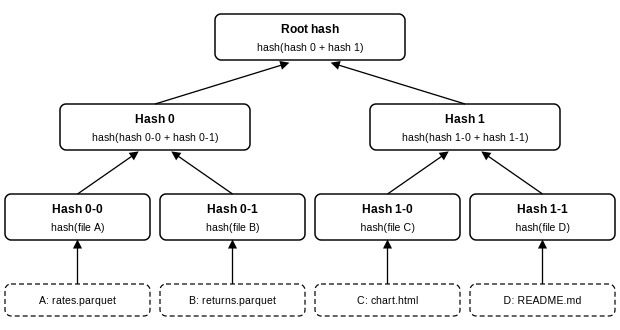
Fig. 27 A hash tree over four files. Change any byte of any file and every hash on the path above it changes, up to the root. Redrawn from Wikipedia’s figure (CC0).#

Git is the standard example, and a full Merkle DAG: a file is a blob named by its hash; a folder is a tree, whose hash covers its entries’ names and hashes; a commit hashes its tree and its parent commits. One commit ID therefore covers the whole repository and its entire history.
ChartBook builds the same kind of structure across pipelines, and computes
every hash one way (chartbook/hashing.py):
A file is the SHA-256 of its bytes.
shasum -a 256 file.parquetgives the same hex.A folder or a glob is the SHA-256 of a listing with one line per file,
<hex of the file's SHA-256> <path inside the asset>, sorted by path. That listing is exactly whatsha256sumprints, so the hash can be reproduced in the shell:cd _data/rates && find . -type f | sed 's|^\./||' \ | grep -viE '(^|/)(\.DS_Store|Thumbs\.db|desktop\.ini|\._[^/]*)$' \ | LC_ALL=C sort | xargs sha256sum | sha256sum
The
grepdrops the files that operating systems create by themselves. (On macOS,shasum -a 256in both places gives the same answer.)A dependency’s
pinned_hash, one per dependency in your lockfile, is the SHA-256 of a listing with one line per pinned asset,<hex of the asset's hash> <asset ID>, sorted by ID. It is a hash of hashes: if any pinned asset of that dependency changes, it changes.
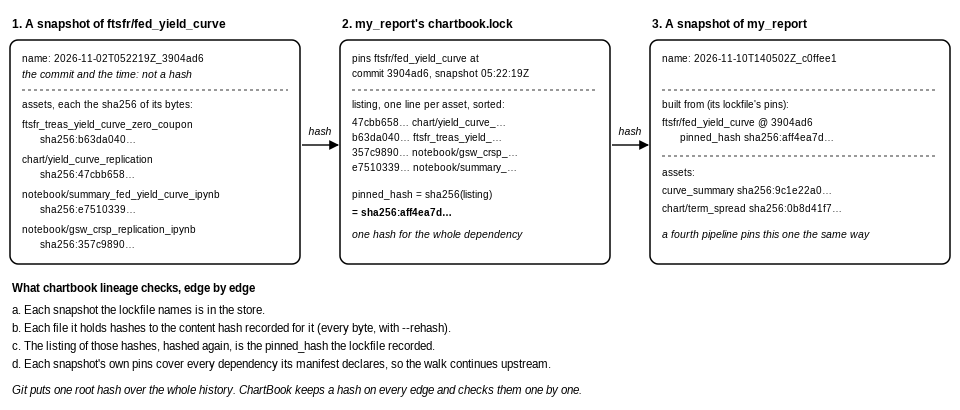
Fig. 28 How ChartBook uses the idea. Every arrow is a hash that chartbook lineage
recomputes and checks. The snapshot’s name is the one thing that is not a
hash: it is the commit and the time.#
The same comparison is how chartbook snapshot knows when it has nothing
to do. It hashes what the build made and compares the hashes, and the
pins, with the snapshots already in the store at this commit. The same
bytes and the same pins mean no new snapshot. New data at the same commit
(the Fed published more days) makes one, named by its time, and because the
store keeps each file once, the new snapshot holds only the files that
changed. The hash is what makes “nothing changed” a fact rather than a
guess.
How far the analogy goes. A folder asset’s hash is a hash over its
files’ hashes, like a git tree (the listing format differs from git’s), and
a pinned_hash is a hash over a dependency’s asset hashes. But a snapshot
is not named by a root hash. Its name is the time it was made and its
commit (2026-11-04T054134Z_5bb7217c30f4), because the same code can make
new bytes on a later day, and the record has to say which. So lineage in
ChartBook is a graph whose every edge is a hash, checked edge by edge rather
than by comparing one root. chartbook lineage starts from your lockfile
and walks up: each snapshot named is in the store, what was pinned from it
is what it holds, each upstream pinned_hash recomputed from the snapshot
it names matches what was recorded, and each snapshot’s pins cover every
dependency its manifest declares. chartbook lineage --rehash also reads
every byte again and checks each file against its hash.
What this buys the class: a reviewer of your pull request reads a diff of
chartbook.lock and knows exactly which bytes moved, by name and by hash,
without rebuilding anything. And a store that lost a file, or a synced
folder that altered one, is caught by lineage --rehash or
store verify before the number it fed reaches a report.
A hash chain proves integrity, not correctness. It shows that these outputs came from those inputs by that commit’s code. Whether the code was right is still a question for tests and review.
Recompute a pin by hand#
You can check a lockfile with nothing but jq and shasum. Take the records
of one dependency, write the listing, and hash it:
$ jq -r '.records[]
    | select(.pipeline == "ftsfr/fed_yield_curve" and .content_hash)
    | "\(.content_hash | ltrimstr("sha256:"))  \(.id)"' chartbook.lock \
    | LC_ALL=C sort -k2 | shasum -a 256
a5f96f21021fee0331f5c1785651cb482a0e9e7280a70337540c818723213dd5  -

$ jq -r '.records[0].dependencies[]
    | select(.id == "ftsfr/fed_yield_curve") | .pinned_hash' chartbook.lock
sha256:a5f96f21021fee0331f5c1785651cb482a0e9e7280a70337540c818723213dd5
The two agree. (These hashes come from a small test pipeline; yours will
differ.) Then shasum -a 256 on the parquet file in the store gives the
content_hash the lockfile records for it. The walkthrough’s
step C does this on the class report.
Relatives#
Delta Lake and Apache Iceberg are table formats: a table stored as Parquet files plus metadata that says which files make up each version. Delta keeps an ordered transaction log (
_delta_log/); Iceberg keeps a tree of metadata files and manifests. Both give ACID writes from many writers, time travel to an earlier version or timestamp, and cleanup of files no retained version needs (Delta’sVACUUM, with a default retention of 7 days; Iceberg’s snapshot expiration). ChartBook shares the ideas of files kept once across versions, time travel, and garbage collection with a retention window. It is not a table format: its unit is a whole pipeline’s outputs at one commit, declared ready by a person, with the code commit, the documentation, and the lineage attached.Git is content-addressed and a full Merkle DAG, and it is where your code and your
chartbook.locklive. Every clone carries every version, which is why large data does not go in git.DVC (Data Version Control) is the closest cousin. It keeps data in a content-addressed cache and a remote, commits small files that record each output’s hash (MD5) to git, hashes a folder as a listing of its files’ hashes, cleans with
dvc gc, and can import data from another DVC repository at a recorded revision. DVC also runs pipeline stages (dvc repro), the jobdoitdoes here. ChartBook leaves the steps inside a repository todoitand concentrates on dependencies between repositories, their documentation, and a catalog over all of them.
Why the data inside is Parquet#
Parquet is a columnar format. A file is divided into row groups;
within each, the values of one column are stored together, encoded and
compressed column by column, and the file’s footer records each column
chunk’s statistics (minimum, maximum, null count). A reader can therefore
skip row groups whose statistics rule out a filter (predicate pushdown)
and read only the columns a query uses (projection pushdown). A
Hive-partitioned folder (year=2024/part-0.parquet) lets a reader skip whole
files by their folder keys. Polars exploits all three: a lazy scan_parquet
followed by .filter() and .select() pushes both into the scan, and
data.load returns exactly such a LazyFrame.
Medium-Sized Data Strategies and
the Polars exercises go further.
Appendix: Upgrade your homework repositories to ChartBook 0.5#
All homework moves to ChartBook 0.5.1 or newer, including any repository of yours that becomes an upstream of the report. HW 3 is already there. HW 1 and HW 2 were written for ChartBook 0.1.1, and the quickest route is to let Claude Code do it with ChartBook’s own skill:
pip install -U chartbook                    # 0.5.1 or newer
chartbook install claude-skill              # user-level: ~/.claude/skills/chartbook/
Then, in the homework folder, ask Claude Code: “Upgrade this repository to
ChartBook 0.5.1.” The skill describes the commands, the manifest, and the
data API, and it names the ChartBook version it was written for; rerun the
install after each upgrade. (chartbook install claude-skill --project puts
the skill in the current repository instead, to commit with it.)
What it does, and the checklist if you do it by hand:
Requirements. In
requirements.txt, replacechartbook==0.1.1withchartbook>=0.5.1andpolars==1.9.0withpolars>=1.33(ChartBook 0.5 needs polars 1.33 or later), thenpip install -r requirements.txt. In a uv project,uv add "chartbook>=0.5.1" "polars>=1.33"changes both pins anduv.locktogether; commitpyproject.tomlanduv.lock. Polars moves forward a long way, so run your tests after upgrading.dodo.py.chartbook build -fis gone in 0.5. Replace it withchartbook docs build -f.chartbook browseis nowchartbook docs open. An old spelling stops with a message that names the new one.Trust. ChartBook runs a folder’s build script only in a folder you have said is yours. Run
chartbook trustonce in each homework folder; until you do,chartbook docs buildrenders the site as it would one from a store, andchartbook runasks first.An old catalog. If you made
~/.chartbook/chartbook.tomlwithchartbook catalog addunder 0.1, runchartbook catalog migrateonce. Catalogs no longer list working folders; they read stores.Check and rebuild.
chartbook checkreads the manifest, anddoitrebuilds. Commit what changed.
Further reading: ChartBook’s Quickstart (a pipeline from nothing in five minutes), its guides to depending on another pipeline and catalogs and stores, the CLI reference, and the design note on the asset graph, which explains the choices above and the prior art (Nix, Cargo, DVC, Snakemake) they borrow from.